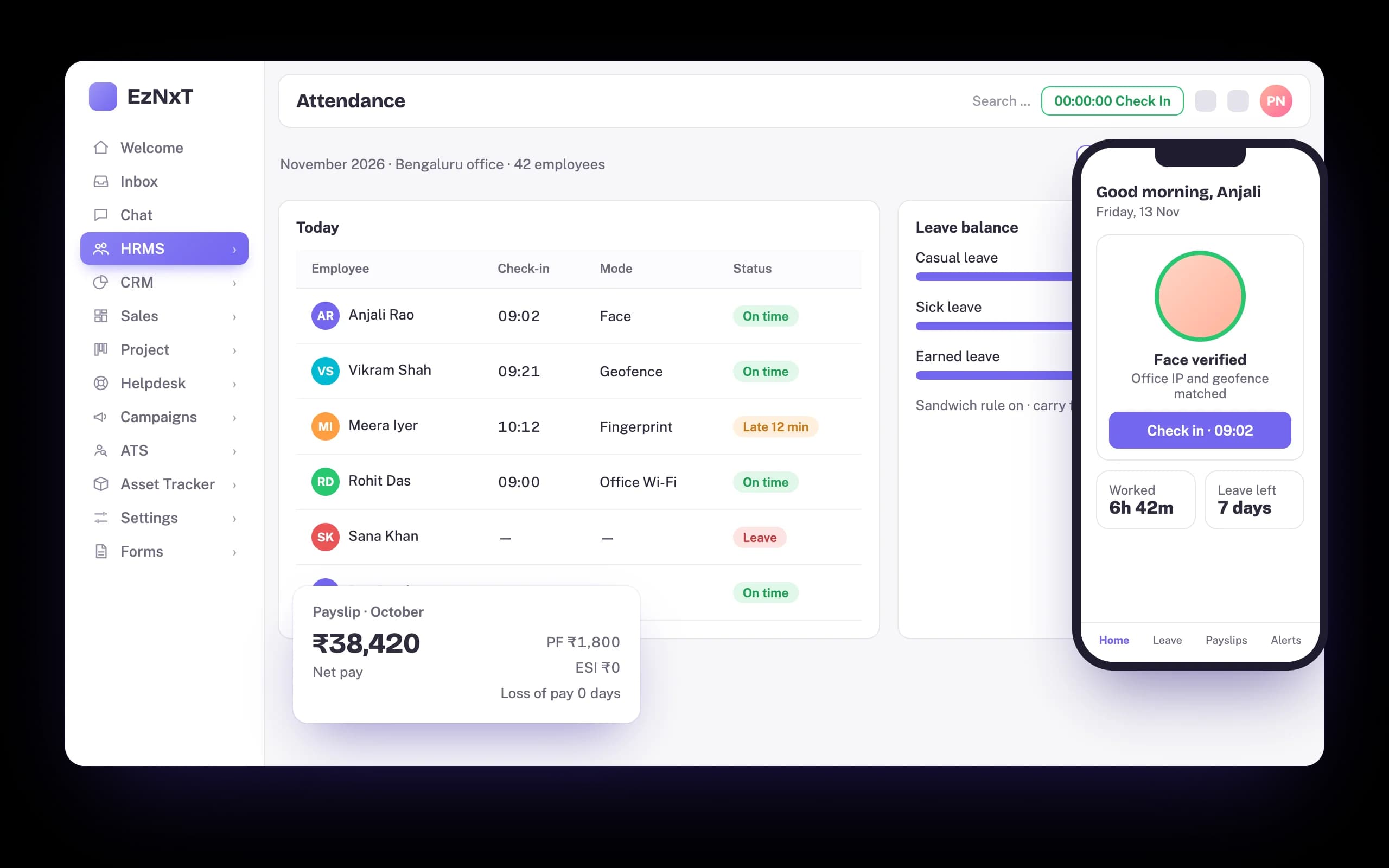
Why do small businesses pick EzNxT HRMS?
Attendance, leave and payroll features that other HR tools sell as add-ons, included for your first ten people.
Face check-in, geofence and IP rules: no add-on fees
Face check-in with a liveness check, office geofences and IP rules. Kredily charges ₹50 per user a month for face and another ₹50 for GPS; here they come with the free plan.
Leave rules written for India
Casual, sick and earned leave with monthly or yearly accrual, carry-forward with an expiry, optional holidays, loss of pay, and the sandwich rule that counts the weekend when leave touches both sides of it.
Payroll with PF, ESI and gratuity built in
Salary templates split CTC into Basic, HRA, allowances, PF with the wage ceiling, employer ESI at 3.25% and gratuity. Run the month, review loss-of-pay days, adjust, finalise, publish payslips.
Employees serve themselves
Staff apply for leave, check balances, download payslips and request an attendance correction with a reason and proof, from the Android or iOS app. HR approves from a list instead of a WhatsApp group.
Every change has a trail
Salary revisions, attendance edits and profile changes are logged with who changed what, from which IP, and why. Payslip and bank details can sit behind an OTP.
One login with hiring, chat and the rest
A hire in the ATS becomes an employee record. Assets get assigned to the person. Team chat and internal mail are in the same app, so nobody installs a fourth tool.
How four very different companies run attendance on it
Shifts, remote staff, branches and a first hire. Same HRMS, different settings.
A 40-person logistics company in Pune with three shifts
Night shift starts at 10 pm, so the shift template says so, and a 10:15 check-in is on time because grace is fifteen minutes. Drivers check in from the app inside the depot geofence; office staff from the office IP range. On the 1st, loss-of-pay days are already in the payroll run.
A 12-person design studio, half of them remote
Remote designers are allowed web check-in with no location rule. The office team uses face check-in on the shared tablet at the door. Leave is casual, sick and earned; earned leave accrues monthly and carries forward up to 30 days, and the sandwich rule is switched off because the founders think it is petty.
A dental clinic chain with four branches
Each branch is an office with its own geofence. Receptionists are restricted to app check-in at their branch. The owner sees all four attendance sheets in one calendar and downloads one Excel for the accountant.
A startup that just hired its eleventh person
The new hire came through the ATS, so the employee record was already there.
What can EzNxT HRMS do for a small business?
Three jobs HR does every month, without the spreadsheets: know who was in, know who is off, pay everyone correctly.
Attendance that fits how your team actually works
Office staff, field staff and remote staff do not check in the same way, so the HRMS does not force them to. Each shift template sets hours, grace minutes and what counts as a half day.
Face check-in with liveness
Enrol once from Settings; afterwards a glance at the phone or laptop camera marks attendance. The liveness check stops a photo of a photo.
API for biometric machines
There is no built-in fingerprint machine support. If you integrate a machine, EzNxT can provide the API to connect it.
Geofence and office Wi-Fi rules
Set a radius around each office and extra locations such as a client site. Or allow check-in only from the office IP range, with per-employee exceptions.
Shifts, weekends and grace time
Morning, evening and night shifts, every second Saturday off, fifteen minutes’ grace, minimum hours for a full or half day. Holidays repeat every year.
Attendance corrections with proof
Forgot to check out? The employee requests a correction with a reason and an attachment; the manager approves or rejects, and the original stays in the log.
Leave policies that need no spreadsheet formula
Every leave type carries its own rules, so a two-day sick leave and a ten-day earned leave are checked differently without HR doing the arithmetic.
Leave types with real rules
Allocation per year or per month, pro-rata for mid-year joiners, carry-forward with an expiry, a maximum balance, half days, and proof required after a set number of days.
Sandwich rule and optional holidays
Leave on Friday and Monday can count the weekend in between, if you choose. Restricted holidays become an optional-holiday leave type employees pick from.
Loss of pay, handled
When the balance runs out, the days become LOP on their own, and payroll picks them up. No separate list of names to remember on the 1st.
Approvals and cancellations
Name who can approve for whom. Employees can ask to cancel approved leave; balances are restored only when a manager agrees.
Calendar and long-leave view
Who is off this week, who is on probation, who is on notice, and who has been out for more than a fortnight, on one screen.
Payroll and employee records in the same place
Salary structures, monthly runs, payslips and the documents behind each person, with access controlled by role.
Salary templates with PF, ESI, gratuity
Define how CTC splits once. PF applies its wage ceiling; employer ESI applies at 3.25% below ₹21,000; gratuity provision is a line, not a surprise.
Monthly payroll run
Generate payslips for the month with LOP from attendance and leave, add an adjustment or waive a day, finalise, and reopen if the CA finds something.
Payslips, bank details and OTP access
Employees download their own payslips. Bank and salary details can require an OTP, so a shared laptop does not leak pay data.
Employee records and documents
ID prefixes you choose, departments and groups, education and past experience, emergency contacts, and documents with expiry dates such as a visa or a licence.
Probation, notice and exit
Probation and notice periods are tracked with dates, and an exit records the type, reason and last working day for the audit trail.
Setting up EzNxT HRMS in a day
Five steps, in the order that avoids rework.
- 1
Upload employees
An Excel with name, email, phone, department and date of joining. Employee IDs follow the prefix you choose.
- 2
Set a shift and a location rule
Office hours, weekends, grace minutes. Add the office address with a geofence radius, or the office IP range, or neither for remote staff.
- 3
Create leave types
Casual, sick and earned to start. Set the yearly allocation, whether it carries forward, whether half days are allowed. Initialise balances for the current year.
- 4
Build one salary template
Basic, HRA, allowances, PF with its ceiling, ESI, gratuity. Assign it to employees with their CTC and the breakdown is calculated.
- 5
Let employees enrol
They install the app, enrol their face, and check in tomorrow. The first payroll run comes at month end.
A company of 30 usually finishes steps 1 to 4 in three to four hours. Face enrolment is thirty seconds per person.
EzNxT HRMS against Keka, greytHR and Kredily on what you pay for
Indian HR tools tend to sell attendance features as add-ons. The free plan here includes them.
| EzNxT HRMS | Keka | greytHR | Kredily | |
|---|---|---|---|---|
| Free plan | 10 users, every feature | None | None; 7-day trial | Unlimited employees, limited: one attendance rule, web clock-in only, 250 MB |
| Paid plan starts at | See the pricing page | About ₹9,999 a month for up to 100 employees (Foundation) | ₹2,495 a month for up to 50 employees (Essential) | ₹1,249 a month for up to 25 employees (Payroll OS) |
| Face attendance | Included, with liveness check | Included | Plan-dependent | ₹50 per user a month (KredEYE) |
| GPS or geofence attendance | Included | Included | Plan-dependent | Selfie/GPS from Professional (₹1,749 a month); live tracking ₹50 per user |
| PF and ESI on payslips | Included | Included | Included | Calculation free; challans and Form 16 on paid plans |
| Appraisals and performance | Not available | Growth plan | Plan-dependent | Enterprise add-on |
| Hiring (ATS) in the same login | Included | Separate product | No | No |
From each vendor’s public pricing page in November 2026. Keka does not publish full rupee pricing; the figure is the one its own landing page and most resellers show. Check current pages before you decide. Sources: Keka pricing, greytHR pricing, Kredily pricing.
Who EzNxT HRMS is for, and who should look elsewhere
Built for companies that have outgrown the attendance register but have not yet hired an HR department.
A good fit if
- Companies with 5 to 200 employees that run payroll in Excel or pay a CA to do it
- Teams with field staff, shifts or several offices that need location-aware attendance
- Founders who want payslips out on time without hiring an HR executive first
- Businesses that also hire, so a candidate can become an employee without re-typing
- Companies where the ₹2,500 to ₹10,000 a month that greytHR or Keka charge is real money
Look elsewhere if
- Companies that need appraisal cycles, OKRs or expense reimbursement inside the HRMS today
- Organisations that need PF ECR and ESI returns filed from the software
- Factories wired to wall-mounted biometric machines that must sync automatically
- Groups with several legal entities needing consolidated payroll
What the HRMS shares with the rest of EzNxT
The same employee record is used by hiring, assets, chat and the audit log.
ATS hire → employee record
A candidate marked hired in EzNxT ATS becomes an employee with the resume and documents already attached.
Attendance → payroll
Half days, late marks and loss-of-pay days from attendance and leave land in the payroll run without a reconciliation sheet.
Employee → assets
Laptops and phones are assigned to the person in Asset Tracker. At exit, HR sees what has to come back.
Team → chat and mail
Direct messages, groups and internal mail in the same app, with push notifications on the phone.
Login → audit trail
Login history shows who signed in from web, Android or iOS and when. Salary revisions and attendance edits carry who, what, why and from which IP.
Frequently asked questions
Pricing, what is included free, compliance limits and setup.
Is face recognition or geofencing an extra charge?
No. Free for up to 10 users. The same features are paid add-ons or higher tiers at Kredily, factoHR and greytHR.
Does EzNxT file PF and ESI for me?
It calculates them. PF, ESI and gratuity sit on each salary template and payslip with the right wage ceilings. Filing the monthly ECR on the EPFO portal and the ESIC return is still done by you or your CA; EzNxT does not upload to government portals yet.
Can employees mark attendance from home or a client site?
If you let them. Each employee can be limited to certain check-in modes. Each office can accept check-ins only from its geofence, only from selected IP addresses (a single address, a range or a CIDR block), or from extra approved locations such as a client site. Every punch stores the location and IP address it came from. A remote employee can be allowed web or app check-in with no location rule at all.
Do I need a biometric machine?
No. Employees check in by face with the camera on their phone or laptop, from the office, from selected IP addresses or from custom locations. EzNxT has no built-in connection to fingerprint or other biometric machines. If you already run one, EzNxT can provide an API so your team can connect it.
What about performance reviews, expense claims and Form 16?
Not in the HRMS today. There are no appraisal cycles, no reimbursement workflow and no Form 16 generation. If those are must-haves now, Keka or greytHR cover them at their price. If attendance, leave and payroll are the problem, start here.
How long does setup take?
Most companies are done in a day: upload the employee list, set one shift template, create three or four leave types, enter one salary template. Face enrolment takes each employee about thirty seconds from their own phone.
What happens when I cross 10 employees?
The first ten stay free and nothing is locked or unlocked. Beyond ten, the plan is on the pricing page, with no tier jump and no per-module charge.
Stop reconciling attendance on the 1st of the month.
Set one shift, three leave types and a salary template this afternoon. Next month the payslips are generated, not assembled.
